22 October 2026
How to use Spectre.Console and NTokenizers to pretify AI chat output

Building a CLI chat app with Spectre and NTokenizers? Here is the How-to for a streamed, syntax-highlighted markdown straight to your terminal.
See it in action
TLDR;
The complete sample, including a custom multiline PromptBox, a model-availability check, and provider selection, lives in the showcase project:
NTokenizers.Extensions.Spectre.Console – AI Example
Example output:
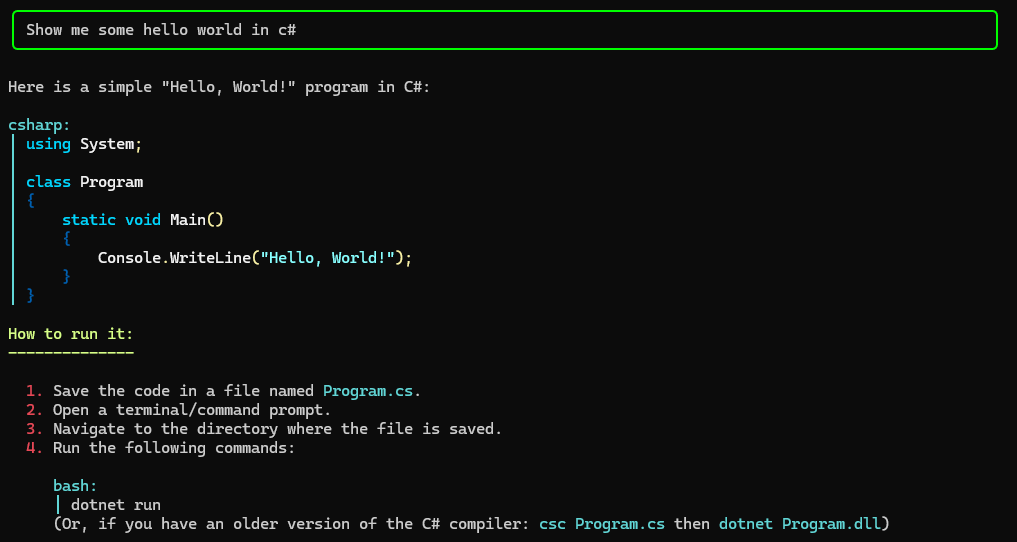
Running a chat app against an OpenAI-compatible API — llama.cpp, OpenAI itself, vLLM, or anything else that speaks the protocol — gives you raw streaming text: one chunk at a time, no frills. That's great for benchmarks, but if you want a nice terminal experience (syntax highlighting, markdown rendering, a spinner while the model thinks), you need a bit of plumbing.
This post walks through how to combine Spectre.Console with NTokenizers.Extensions.Spectre.Console to render streamed AI chat output in your terminal, using the standard OpenAI-compatible API.
The stream is the key
NTokenizers.Extensions.Spectre.Console renders a Stream of markdown with syntax highlighting, character by character. So the first thing to solve is: how do you turn the streamed chat response into a Stream?
A chat client (Microsoft.Extensions.AI) hands you an IAsyncEnumerable<ChatResponseUpdate> — chunks, not a stream. The bridge is System.IO.Pipelines.Pipe: you write each chunk into one end of the pipe and read it back as a Stream on the other end. Pipes were built exactly for this kind of producer/consumer scenario: async-friendly, backpressure-aware, and low on allocations.
Converting the chat stream to a Stream
The key method looks like this:
using Microsoft.Extensions.AI;
using System.IO.Pipelines;
using System.Text;

public static Stream GetChatResponseStream(
    IChatClient chatClient,
    IList<ChatMessage> history,
    ChatOptions options,
    CancellationToken ct,
    out Task firstChunkTask)
{
    var pipe = new Pipe();
    var tcs = new TaskCompletionSource(TaskCreationOptions.RunContinuationsAsynchronously);
    firstChunkTask = tcs.Task; // lets the caller wait until the first chunk arrives

    _ = Task.Run(async () =>
    {
        await foreach (var chunk in chatClient.GetStreamingResponseAsync(history, options, ct))
        {
            if (!string.IsNullOrEmpty(chunk.Text))
            {
                // Signal that the first chunk arrived (used to stop the spinner)
                tcs.TrySetResult();

                var bytes = Encoding.UTF8.GetBytes(chunk.Text);
                await pipe.Writer.WriteAsync(bytes, ct);
            }
        }

        await pipe.Writer.CompleteAsync();
    }, ct);

    return pipe.Reader.AsStream();
}
A few things to notice:
- We expose a
firstChunkTaskso the caller can show a "Processing..." spinner only until the model starts answering. - The cancellation token is passed all the way through, so the request can be cancelled from the caller.
- When the loop finishes we complete the writer — that's what tells the reader side "you're done".
Setting up the OpenAI client
The example below points at a llama.cpp server on localhost, but the same setup works for any OpenAI-compatible endpoint:
dotnet add package Microsoft.Extensions.AI --version 10.10.0
dotnet add package Microsoft.Extensions.AI.OpenAI --version 10.10.1
dotnet add package Microsoft.Extensions.Hosting --version 10.0.12
using Microsoft.Extensions.AI;
using Microsoft.Extensions.DependencyInjection;
using Microsoft.Extensions.Hosting;
using OpenAI;
var builder = Host.CreateApplicationBuilder();
builder.Services.AddSingleton<ChatService>();
var endpoint = "http://localhost:8080/"; // llama.cpp server (or any OpenAI-compatible endpoint)
var modelId = "unsloth/Qwen3-Coder-30B-A3B-Instruct-GGUF:Q6_K";
var apiKey = "dummy"; // for OpenAI: your real key, e.g. "sk-..."
builder.Services.AddChatClient(new OpenAIClient(
new ApiKeyCredential(apiKey),
new OpenAIClientOptions { Endpoint = new Uri(endpoint) })
.GetChatClient(modelId)
.AsIChatClient()
.AsBuilder()
.UseFunctionInvocation()
.Build());
var app = builder.Build();
var chatService = app.Services.GetRequiredService<ChatService>();
await chatService.StartAsync();For llama.cpp the apiKey can be anything — it doesn't validate it. For OpenAI (or Azure, OpenRouter, etc.) you'd set your real key and change the endpoint accordingly.
The chat loop
Here's the chat service that ties it all together. It shows a spinner while waiting for the first chunk, and renders the streaming response with markdown:
using Microsoft.Extensions.AI;
using Spectre.Console;
using System.IO.Pipelines;
using System.Text;

public partial class ChatService
{
    [Dependency]
    private readonly IChatClient _chatClient;

    public async Task StartAsync()
    {
        var chatOptions = new ChatOptions { };
        List<ChatMessage> chatHistory = [];

        while (true)
        {
            Console.WriteLine();

            var userPrompt = AnsiConsole.Prompt(new PromptBox().Placeholder("Your prompt"));

            if (string.Equals(userPrompt, "bye", StringComparison.OrdinalIgnoreCase))
            {
                break;
            }

            chatHistory.Add(new ChatMessage(ChatRole.User, userPrompt));

            var stream = GetChatResponseStream(
                _chatClient, chatHistory, chatOptions, CancellationToken.None, out var firstChunkTask
                );

            // Spinner only until the first chunk arrives
            await AnsiConsole.Status()
                .Spinner(Spinner.Known.Dots)
                .SpinnerStyle(new Style(foreground: Color.Green))
                .StartAsync("Processing...", async ctx =>
                {
                    await firstChunkTask;
                });

            AnsiConsole.Console.WriteLine();

            // Streamed markdown rendering with syntax highlighting
            var result = await AnsiConsole.Console.WriteMarkdownAsync(stream, encoding: Encoding.UTF8);

            chatHistory.Add(new ChatMessage(ChatRole.Assistant, result));
            System.Console.WriteLine();
        }

        AnsiConsole.MarkupLine("[red]Bye, Bye! 💖[/]");
    }
}
WriteMarkdownAsync does the heavy lifting: it reads the stream as it grows, parses markdown, and renders code blocks with syntax highlighting while the model is still generating. No waiting for the full answer.